
Remember the good old days when we used to ghost every Terminal Server and then doing numerous of manally steps to get it up and running ? Recently I had a customer with over 50 apps that needed to be up an running in notime so I decided to try out the new Citrix Provisioning Server PS Integration Utility.
Download an extract the content of the zip file. Don’t install the PVS PS Integration Utility.msi on your Terminal Servers because the vbs files you need are provided in the zip file itself. This file are either cpsmods40.vbs or cpsmods45.vbs.
Make an GPO or edit an existing ex “XenApp Server Policy” in your Terminal Server OU to include the cpsmods4x.vbs as an Startup Script.
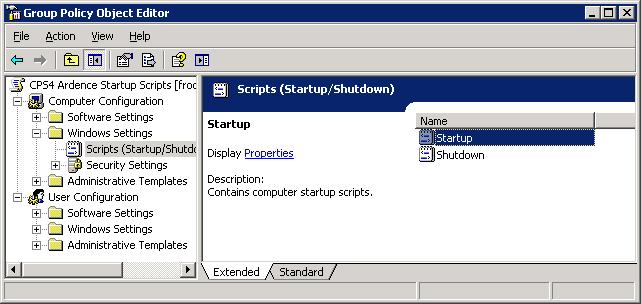
Make sure to add Startup with a capital “S” in the parameters field

Now go ahead and install all your software, hotfixes and patches prior to running Sysprep.
It’s a good idea to keep the cpsmods4x.vbs file in the Sysprep catalog.
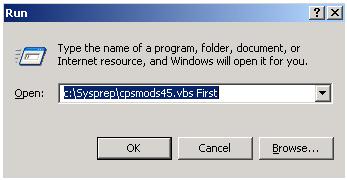
Start the cpsmods4.x.vbs with First as the parameter

Now run your Sysprep and then use e.g. Windows Deployment Services to capture & distribute your image.
Sounds cool. What does it do exactly?
Dan
It takes away Citrix specific settings ex localhost cache, registry settings and ticketing. Everything is docmented in the Citrix PVS guide.